Running Linux Mint is usually painless, but this evening I felt like I was babysitting a Gentoo install again. I had updated the system last night before bed, and shut off the PC as normal.
The next day after work, I booted into a screen that appeared fine on one side, but was either black on the other, or looked like a pinstripe suit some used car salesmen would have on.
Performance was also terrible and just trying to Ctrl+Alt+F3 into another TTY was unresponsive.
I am running an AMD Radeon RX6800XT on this machine, and a quick google search, and users on Reddit showed others where having the same issue.
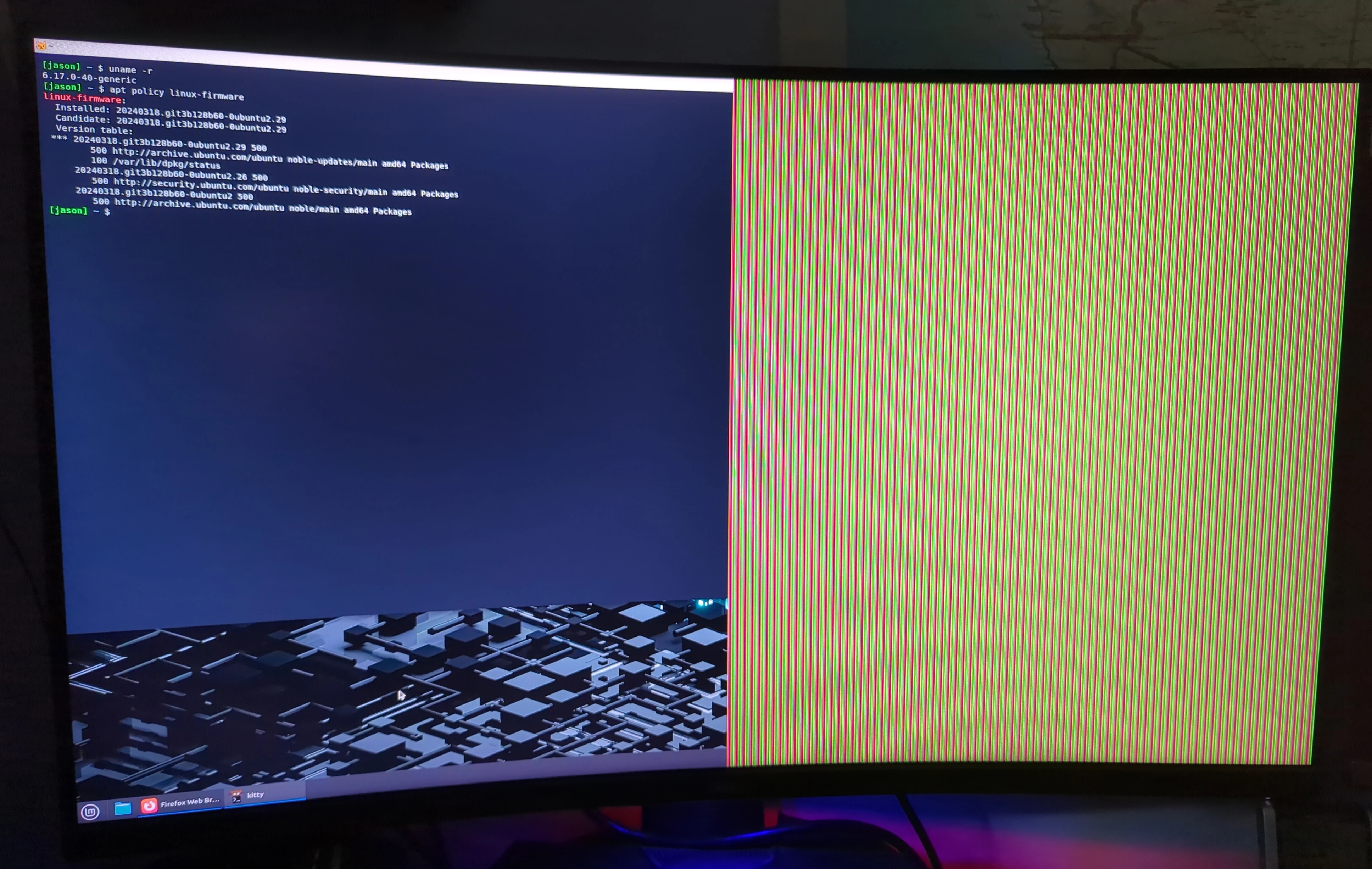 Here is how I fixed it and a little bit of my thought process.
First diagnosis
First thing I looked at was what kernel version I was running: uname -r showed I was on kernel 7.0.0.29 which is new so I decided to boot back into an older kernel and see what happened. Same issue but performance was notably better and I was able to rescue the system with only half a screen.
- The original kernel suspicion was reasonable, but the older-kernel test disproved it quickly. That test saved us from chasing the wrong subsystem.
I also tried to plug my monitor into the Intel graphics port of my Z390 motherboard to see if that helped since I was switching from AMD to Intel graphics. The monitor display was better but there was still a lot of lag and weird graphics glitches like screen tearing when opening Firefox.
The solution for now
Downgrade the firmware to .26 instead of switching kernels because the firmware upgrade was the problem not the newer kernel.
The issue still existed when booting into an older kernel version so downgrading the linux-firmware package as stated below and then holding it until a stable version is released is the correct way to solve the problem.
Checking kernel version since I booted into an older kernel to test
[jason] ~ $ uname -r
6.17.0-40-generic
- Yeah, booting into an older kernel and still having same issues.
Checking to see what firmware version I am running
[jason] ~ $ apt policy linux-firmware
linux-firmware:
  Installed: 20240318.git3b128b60-0ubuntu2.29
  Candidate: 20240318.git3b128b60-0ubuntu2.29
  Version table:
 *** 20240318.git3b128b60-0ubuntu2.29 500
        500 http://archive.ubuntu.com/ubuntu noble-updates/main amd64 Packages
        100 /var/lib/dpkg/status
     20240318.git3b128b60-0ubuntu2.26 500
        500 http://security.ubuntu.com/ubuntu noble-security/main amd64 Packages
     20240318.git3b128b60-0ubuntu2 500
        500 http://archive.ubuntu.com/ubuntu noble/main amd64 Packages
- Yeah, its running the newest version so lets downgrade it
Downgrading the linux-firmware package manually
[jason] ~ $ sudo apt install linux-firmware=20240318.git3b128b60-0ubuntu2.26
[sudo] password for jason:
Reading package lists... Done
Building dependency tree... Done
Reading state information... Done
The following packages were automatically installed and are no longer required:
  linux-headers-7.0.0-28-generic linux-hwe-7.0-headers-7.0.0-28 linux-hwe-7.0-tools-7.0.0-28 linux-image-7.0.0-28-generic linux-modules-7.0.0-28-generic linux-tools-7.0.0-28-generic
Use 'sudo apt autoremove' to remove them.
The following packages will be DOWNGRADED:
  linux-firmware
0 upgraded, 0 newly installed, 1 downgraded, 0 to remove and 0 not upgraded.
Need to get 634 MB of archives.
After this operation, 21.2 MB disk space will be freed.
Do you want to continue? [Y/n] y
Get:1 http://security.ubuntu.com/ubuntu noble-security/main amd64 linux-firmware amd64 20240318.git3b128b60-0ubuntu2.26 [634 MB]
Fetched 634 MB in 1min 27s (7,297 kB/s)
dpkg: warning: downgrading linux-firmware from 20240318.git3b128b60-0ubuntu2.29 to 20240318.git3b128b60-0ubuntu2.26
(Reading database ... 610280 files and directories currently installed.)
Preparing to unpack .../linux-firmware_20240318.git3b128b60-0ubuntu2.26_amd64.deb ...
Unpacking linux-firmware (20240318.git3b128b60-0ubuntu2.26) over (20240318.git3b128b60-0ubuntu2.29) ...
Setting up linux-firmware (20240318.git3b128b60-0ubuntu2.26) ...
Processing triggers for initramfs-tools (0.142ubuntu25.8) ...
update-initramfs: Generating /boot/initrd.img-7.0.0-29-generic
I: The initramfs will attempt to resume from /dev/dm-2
I: (/dev/mapper/vgmint-swap_1)
I: Set the RESUME variable to override this.
Updating initramfs to include the downgraded firmware
[jason] ~ $ sudo update-initramfs -u -k all
update-initramfs: Generating /boot/initrd.img-7.0.0-29-generic
I: The initramfs will attempt to resume from /dev/dm-2
I: (/dev/mapper/vgmint-swap_1)
I: Set the RESUME variable to override this.
update-initramfs: Generating /boot/initrd.img-7.0.0-28-generic
I: The initramfs will attempt to resume from /dev/dm-2
I: (/dev/mapper/vgmint-swap_1)
I: Set the RESUME variable to override this.
update-initramfs: Generating /boot/initrd.img-6.17.0-40-generic
I: The initramfs will attempt to resume from /dev/dm-2
I: (/dev/mapper/vgmint-swap_1)
I: Set the RESUME variable to override this.
update-initramfs: Generating /boot/initrd.img-6.14.0-37-generic
I: The initramfs will attempt to resume from /dev/dm-2
I: (/dev/mapper/vgmint-swap_1)
I: Set the RESUME variable to override this.
Holding the firmware version until a patch is released
[jason] ~ $ sudo apt-mark hold linux-firmware
linux-firmware set on hold.
Double checking that the correct firmware is selected
[jason] ~ $ apt policy linux-firmware
linux-firmware:
  Installed: 20240318.git3b128b60-0ubuntu2.26
  Candidate: 20240318.git3b128b60-0ubuntu2.29
  Version table:
     20240318.git3b128b60-0ubuntu2.29 500
        500 http://archive.ubuntu.com/ubuntu noble-updates/main amd64 Packages
 *** 20240318.git3b128b60-0ubuntu2.26 500
        500 http://security.ubuntu.com/ubuntu noble-security/main amd64 Packages
        100 /var/lib/dpkg/status
     20240318.git3b128b60-0ubuntu2 500
        500 http://archive.ubuntu.com/ubuntu noble/main amd64 Packages
Notice the *** showing us which package is selected.
Verifying that the package is on hold
[jason] ~ $ apt-mark showhold
hugo
linux-firmware
This is just a double check to make sure the package we want is actually on hold. In my case, Hugo is also on hold (which is what I used to build this site BTW), so I may have to look into that but notice that linux-firmware is being held back.
That is what we want to see until it is patched.
Even after it is patched, this looks like an issue that probably happens on occasion, so the process could work on other packages as well, if something randomly breaks.
Conclusion
This process fixed the issue but also took me 2 hours to figure out what went wrong after working all day and just wanting to come home, eat a hot meal and do some gaming… However, it would have taken me much longer if I did not think through the problem and ask the right questions.
That is where I have grown the most over the past few years of running Linux machines full time. The old version of me would have hit a dead end and just reinstalled the OS, or distro hopped.
Now I sit back and ask “what could be causing this and how do I figure out where the problem is?” That is probably more valuable than just rage quitting when things get tough.